N° 01 — Index 2026

My portfolio.

Nathanael Tan Cua · Computer Engineer · Philippines

synced today · github.com/natadecua
Selected works 12 repos

01

git-portfolio

· ★ 0 · today
Project

git-portfolio.

View on GitHub ↗
★ 0 Updated today

No README provided.

02

favour.ph

TypeScript · ★ 0 · 1d
Project

favour.ph.

A b2b business discovery platform

View on GitHub ↗
TypeScript ★ 0 Updated 1d

Favour.ph

Home services booking marketplace — Philippines.

Team

Role Person GitHub
Frontend Nathan @natadecua
Backend James @jamesejercito
PM / Full Stack Milo @[miloperezes]

Stack

  • Frontend: Next.js 14, Tailwind CSS, Supabase Auth
  • Backend: [James to fill — Node/Express or similar]
  • Database: PostgreSQL (Supabase)
  • Notifications: Semaphore PH (SMS), Nodemailer (email)

Local Setup

Client

cd client && npm install && npm run dev

Server

cd server && npm install && npm run dev

Branch Strategy

  • main — production
  • dev — integration, all PRs go here first
  • feature/* — individual work

Commit Convention

feat: add provider profile page
fix: correct booking status update
chore: update dependencies
docs: update README

03

rialc1-ui

JavaScript · ★ 0 · 8w
Project

rialc1-ui.

thesis ui design

View on GitHub ↗
JavaScript ★ 0 Updated 8w

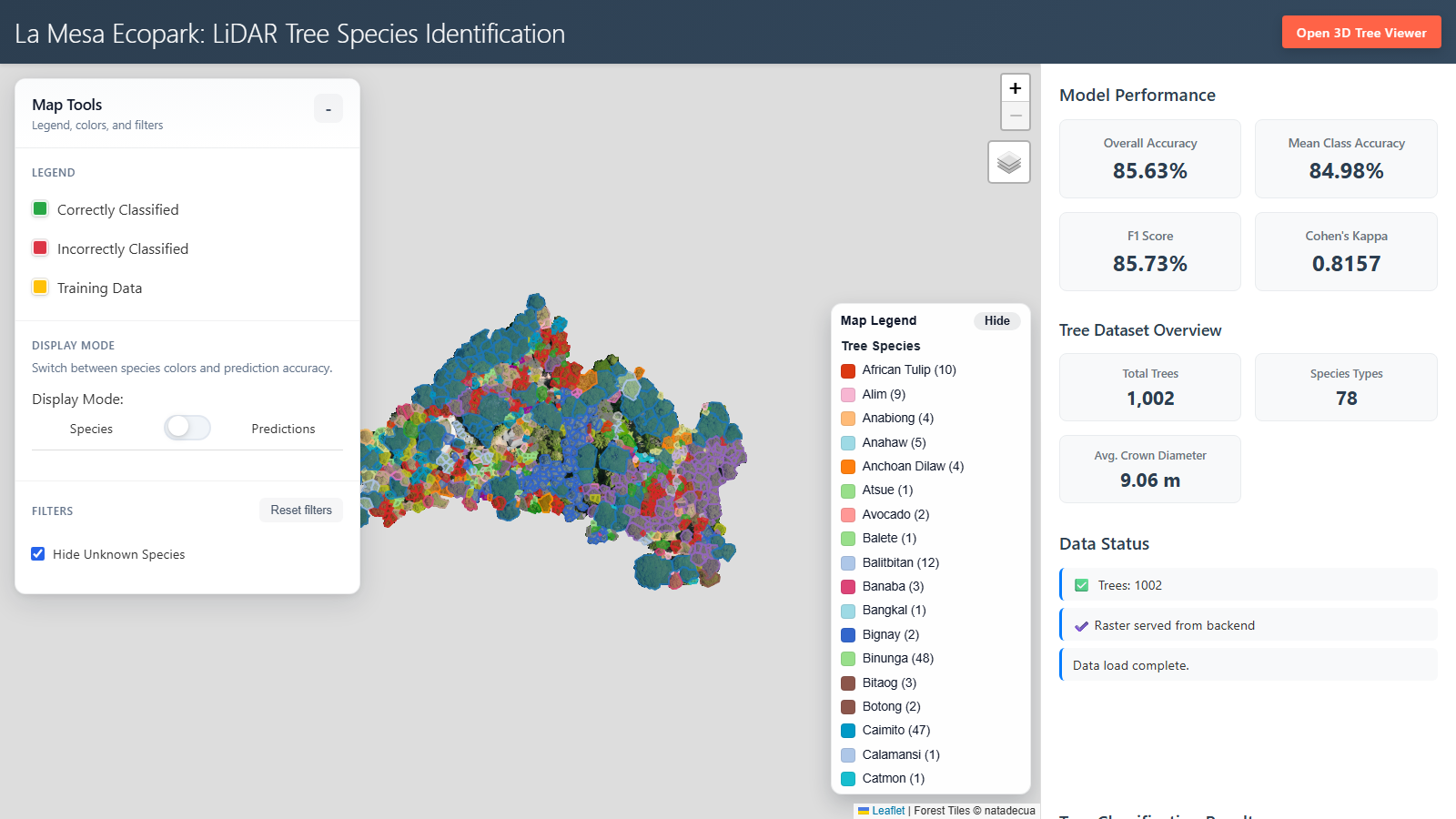
La Mesa Ecopark LiDAR Tree Species Identification UI

Interactive thesis web application for exploring tree species classification outputs using:

  • a 2D Leaflet map for crown polygons, predictions, and map overlays
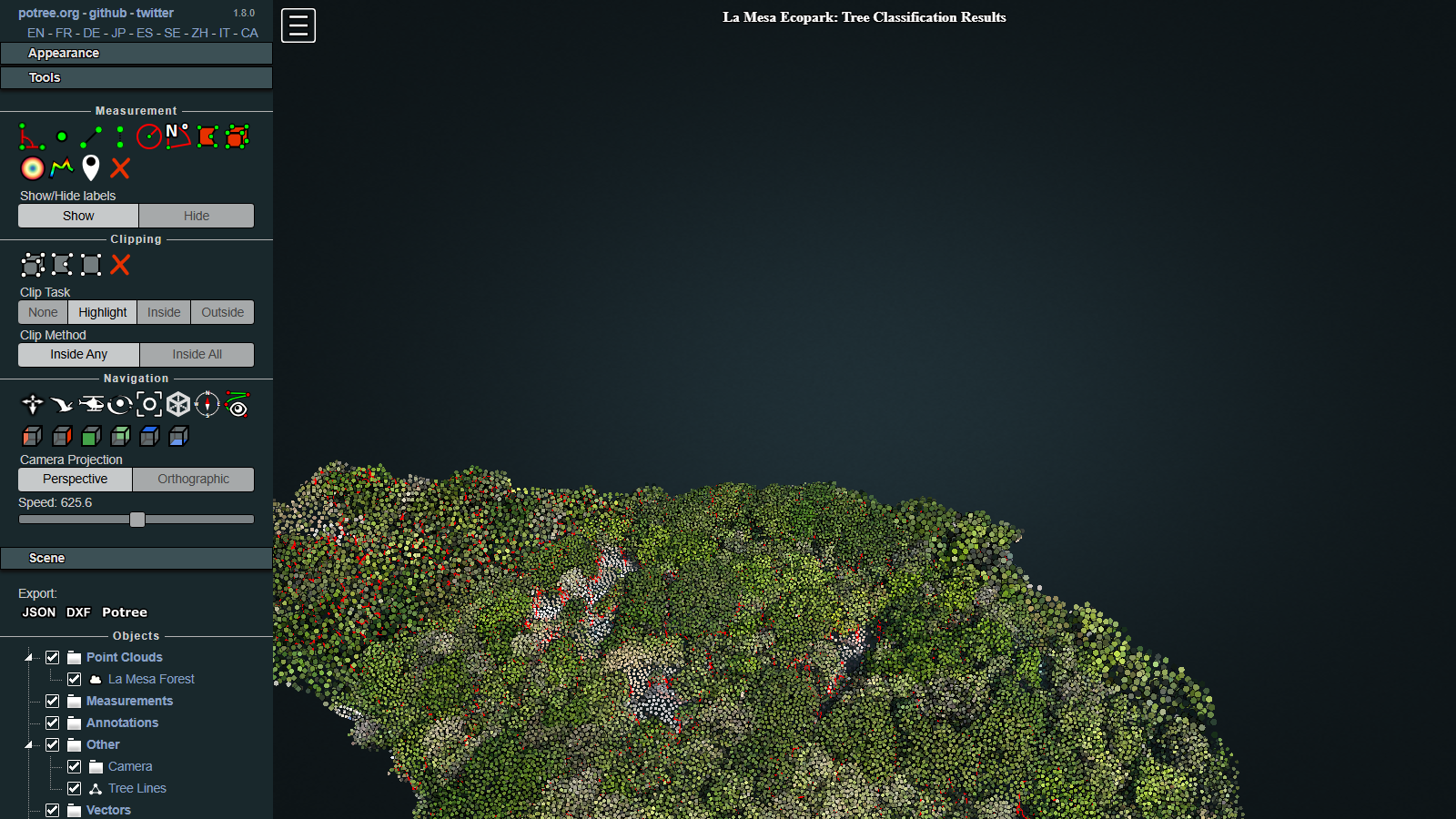
  • a 3D point cloud workflow (Potree + Three.js) for tree-level LiDAR inspection
  • an Express API that streams per-tree sampled points with in-memory caching

Table of Contents

  1. Portfolio Summary
  2. Thesis Context
  3. My Role and Ownership
  4. Key Achievements
  5. Screenshots (Project Showcase)
  6. System Overview
  7. Architecture
  8. Tech Stack
  9. Repository Layout
  10. Data Assets and Requirements
  11. GitHub + Large File Strategy
  12. Quick Start
  13. Run and Validate
  14. API Reference
  15. Point Cache Build Workflow
  16. Development Commands
  17. Cloudflare Tunnel (Remote Testing)
  18. Performance Notes
  19. Troubleshooting
  20. Known Limitations

Portfolio Summary

This project is an end-to-end geospatial and machine-learning visualization system I built for my thesis. It transforms large LiDAR-derived tree datasets into an interactive web product that supports model validation, spatial analysis, and communication of results to both technical and non-technical audiences.

For employers, this project demonstrates my ability to:

  • build full-stack systems from research requirements to deployable software
  • handle large geospatial data under real storage and bandwidth constraints
  • design for performance, maintainability, and clear user workflows
  • translate academic work into practical decision-support tools

Thesis Context

Problem

Tree-species classification outputs from LiDAR pipelines are difficult to evaluate using static outputs alone. Users need spatial context, model prediction visibility, and tree-level 3D drill-down in one workflow.

Objective

Design and implement a web application that enables users to:

  1. explore crown polygons and prediction layers in 2D,
  2. inspect point-cloud structure in 3D,
  3. retrieve tree-level points quickly without loading massive raw files directly in the browser,
  4. support repeatable analysis for thesis validation and presentation.

Outcome

I delivered a working thesis UI that combines Leaflet, Potree, and a custom Express API with reservoir sampling and cache preloading. The system provides practical performance on large datasets and supports both research review and demonstration use cases.


My Role and Ownership

I led implementation across data, backend, frontend, and operations:

  • System architecture: route/data design, static serving strategy, and integration flow
  • Backend engineering: point-cloud API with cache-first loading and CSV fallback behavior
  • Data engineering: streaming cache builder for very large source CSV files
  • Frontend engineering: interactive 2D/3D workflows and tree-level inspection UX
  • Repository operations: Git/LFS large-file strategy and maintainable documentation

Key Achievements

  • Built a browser-based geospatial thesis product on real-world, high-volume assets.
  • Implemented efficient per-tree point retrieval using reservoir sampling.
  • Added precomputed NDJSON cache loading for faster repeated tree queries.
  • Tuned static asset delivery and caching behavior for map tiles and point-cloud binaries.
  • Created a reproducible workflow for dataset updates and cache regeneration.

Screenshots (Project Showcase)

1) Main 2D map interface

Main 2D map interface

2) Potree main scene viewer

Potree main viewer

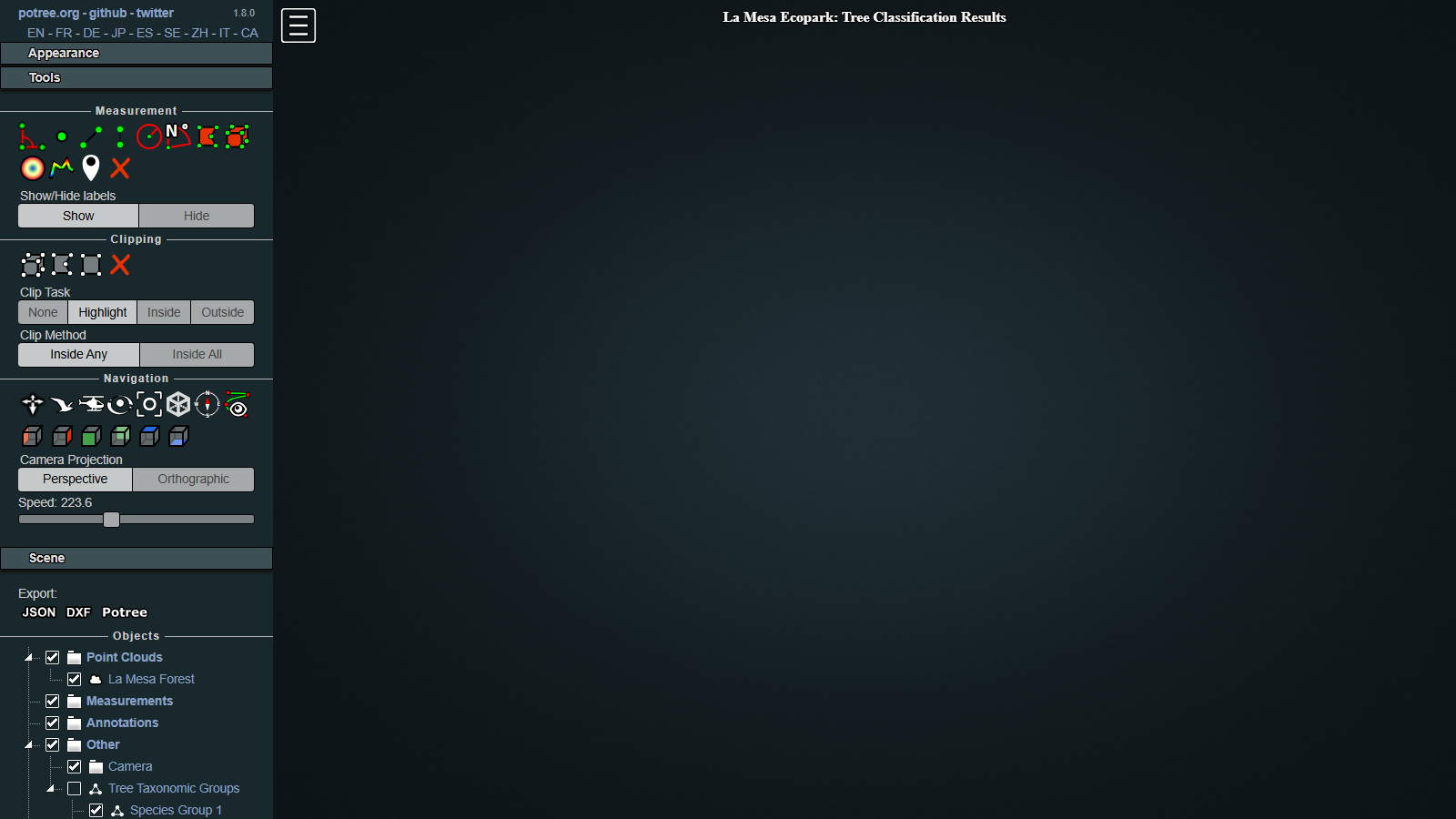
3) Alternate Potree workflow

Potree alternate viewer

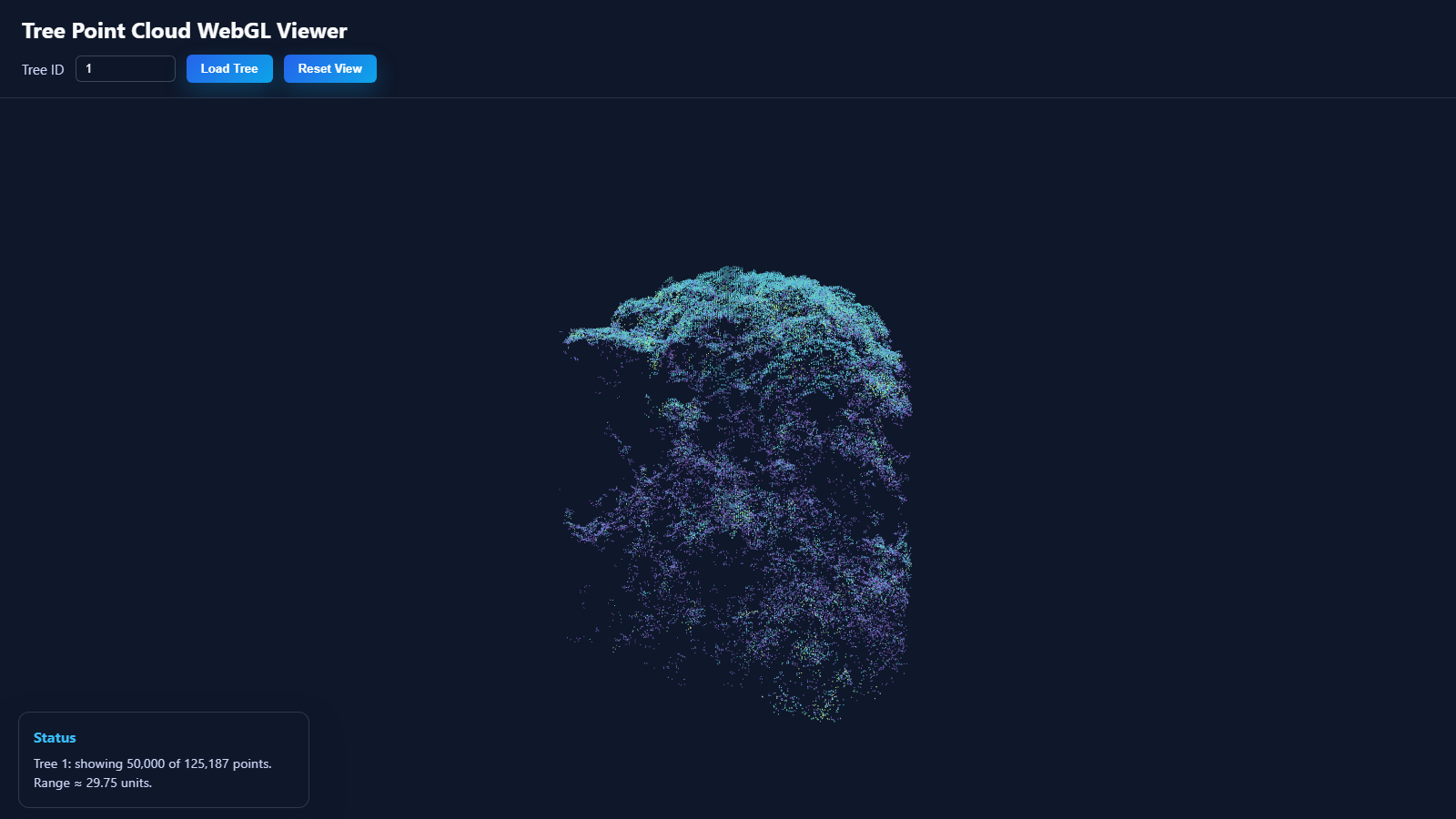
4) Per-tree point cloud viewer

Per-tree point cloud viewer


System Overview

This project supports analysis of LiDAR-derived tree data in two complementary views:

  • 2D analysis view: interact with crowns, predictions, and map layers.
  • 3D analysis view: inspect sampled point clouds per tree or view full scene point cloud assets.

The backend is optimized to avoid sending huge CSV/LAS files directly to the client for tree-level interactions. Instead, it serves a sampled JSON response per tree via GET /api/trees/:treeId/pointcloud.


Architecture

Backend (server.js)

  • Serves static frontend files from public/.
  • Serves local vendor Three.js modules under /vendor/three and /vendor/three/examples/jsm.
  • Serves project data folders:
    • /raw_dataraw_data/
    • /tileslamesa_forest_final_fixed/
    • /Potree_1.8.2Potree_1.8.2/
  • Exposes API endpoints:
    • /api/status
    • /api/trees/:treeId/pointcloud

Point cloud API data flow

  1. Try to load precomputed samples from raw_data/tree_point_samples.json (NDJSON format).
  2. If present, materialize sampled tuples in memory and serve quickly.
  3. If absent or missing tree entry, fall back to streaming scan of raw_data/newgroups_adjusted_all_v3.csv with reservoir sampling.
  4. Cache results in process memory for subsequent requests.

Frontend

  • Main app: public/index.html + public/script.js
  • Main Potree page: public/view_lamesa.html
  • Additional viewer pages for alternate workflows in public/

Tech Stack

  • Runtime: Node.js + Express
  • Frontend map: Leaflet
  • 3D rendering: Potree 1.8.2 + Three.js
  • Data parsing: csv-parser, shapefile
  • Dev tooling: ESLint, Prettier
  • Large assets: Git LFS

Repository Layout

rialc1-ui/
├─ server.js                          # Express server, static mounts, API
├─ package.json                       # Scripts and dependencies
├─ public/                            # Frontend pages/scripts/styles/service worker
│  ├─ index.html                      # Main 2D map entry page
│  ├─ script.js                       # Main map logic
│  ├─ view_lamesa.html                # Main Potree scene viewer page
│  ├─ lamesa_potree_viewer.html       # Potree viewer variant
│  ├─ js/                             # Point cloud viewer modules
│  └─ service-worker.js               # Client caching behavior
├─ raw_data/                          # Shapefiles, predictions, point-cloud assets, cache
│  ├─ merged_recropped_brotli/        # Potree metadata + octree/hierarchy binaries
│  ├─ shapefiles/                     # Crown/line shapefile bundles
│  ├─ tree_point_samples.json         # Precomputed NDJSON per-tree cache (LFS)
│  └─ prediction_results*.csv         # Model outputs used by UI
├─ lamesa_forest_final_fixed/         # Pre-rendered map tiles (LFS)
├─ Potree_1.8.2/                      # Potree distribution
└─ scripts/
    └─ build-tree-point-samples.js     # Builds `tree_point_samples.json`

Data Assets and Requirements

Required for normal app usage

  • raw_data/tree_point_samples.json (recommended for fast per-tree API responses)
  • raw_data/shapefiles/* (polygon/line overlays)
  • raw_data/prediction_results_top5.csv (classification outputs)
  • lamesa_forest_final_fixed/ tiles

Required for rebuilding the cache

  • raw_data/newgroups_adjusted_all_v3.csv

This source CSV is intentionally not tracked on GitHub (see large-file policy below), so place it manually in raw_data/ before running cache rebuild.


GitHub + Large File Strategy

This repository uses Git LFS for large assets (tiles, point cloud binaries, large cache artifacts).

Why this is necessary

  • GitHub blocks regular Git blobs over 100 MB.
  • GitHub LFS also has hard size
04

mejore-mes

JavaScript · ★ 0 · 2mo
Project

mejore-mes.

View on GitHub ↗
JavaScript ★ 0 Updated 2mo

Mejore Furniture MES — Proof of Concept

What This Is

A full-stack Manufacturing Execution System (MES) MVP connecting:

  • PYTHA (CAD → BOM export via XML/CSV)
  • Order Time (Inventory, Work Orders, BOM via REST API at services.ordertime.com/api)
  • QuickBooks Online (Finance, Job Costing via Intuit REST API + OAuth2)
  • Custom MES App (Tablet React PWA for factory floor)

Stack

  • Backend: Node.js + Express + PostgreSQL
  • Frontend: React (Vite PWA) + Tailwind CSS
  • Integrations: Order Time REST API, QB Online API (OAuth2), PYTHA XML parser

How to Run (Dev)

1. Install deps

cd backend && npm install
cd ../frontend && npm install

2. Setup environment

cp backend/.env.example backend/.env

Fill in your OT API key, QB credentials, DB URL

3. Run DB migrations

cd backend && npm run migrate

4. Start backend (port 3001)

cd backend && npm run dev

5. Start frontend (port 5173)

cd frontend && npm run dev

API Proof Points (from official docs)

System Base URL Auth Method Key Endpoints Used
Order Time https://services.ordertime.com/api Header: apiKey + email + password /workorder, /bom, /bomcomponent, /partitem, /filllineitem
QuickBooks Online https://quickbooks.api.intuit.com/v3/company/{realmId} OAuth2 Bearer Token /invoice, /customer, /query
PYTHA Local file export File system watcher XML/CSV BOM parse → OT import

Key Architecture Decisions

  1. OT is source of truth for inventory & work orders — MES reads/writes via REST API
  2. PYTHA has no REST API — Uses its built-in XML export + a file-watcher service that auto-imports into OT
  3. QB syncs via OT's native QB integration — We call QB directly only for invoice/payment status reads
  4. Offline mode — Frontend caches scans in IndexedDB, syncs when back online
05

mahjongman

· ★ 0 · 3mo
Project

mahjongman.

New Mahjong Game MVP Test

View on GitHub ↗
★ 0 Updated 3mo

New Mahjong Game MVP Test

06

personal-portfolio

HTML · ★ 0 · 5mo
Project

personal-portfolio.

A web based portfolio as a requirement for the LBYCPG3 Web development course

View on GitHub ↗
HTML ★ 0 Updated 5mo

Portfolio Website

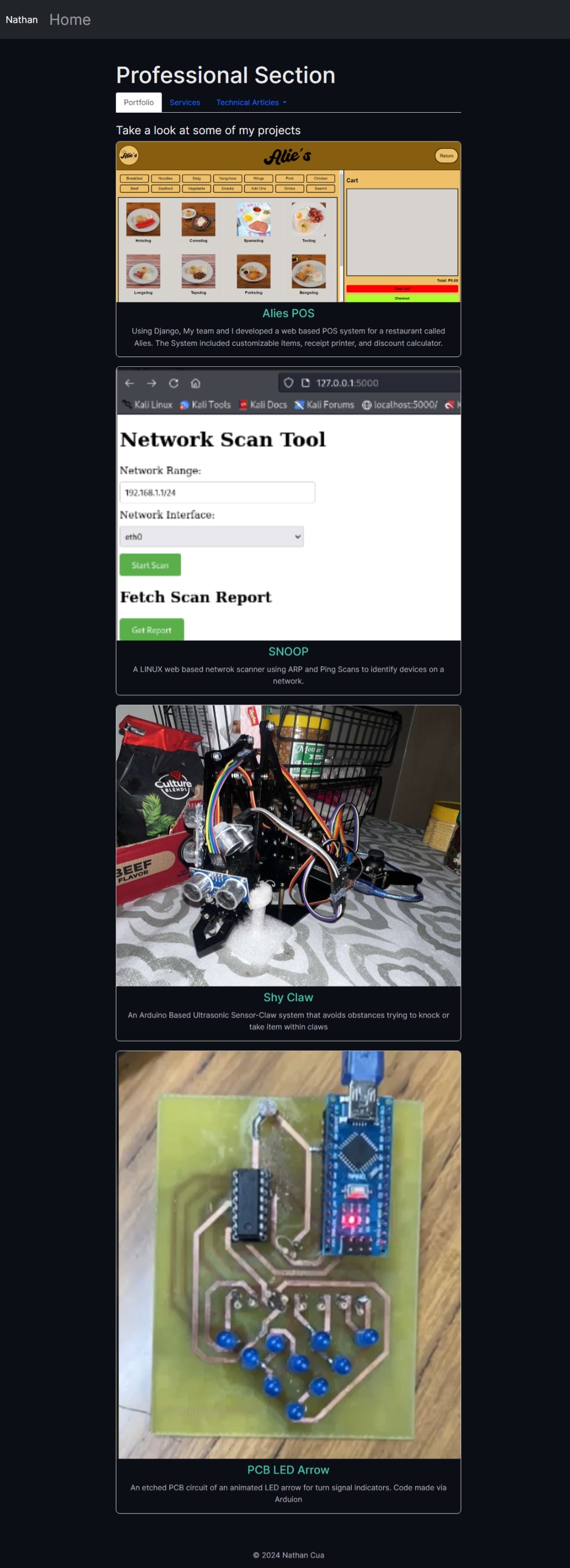
This repository contains the source code for my portfolio website. It showcases my personal and professional projects, technical articles, and other achievements.

Features

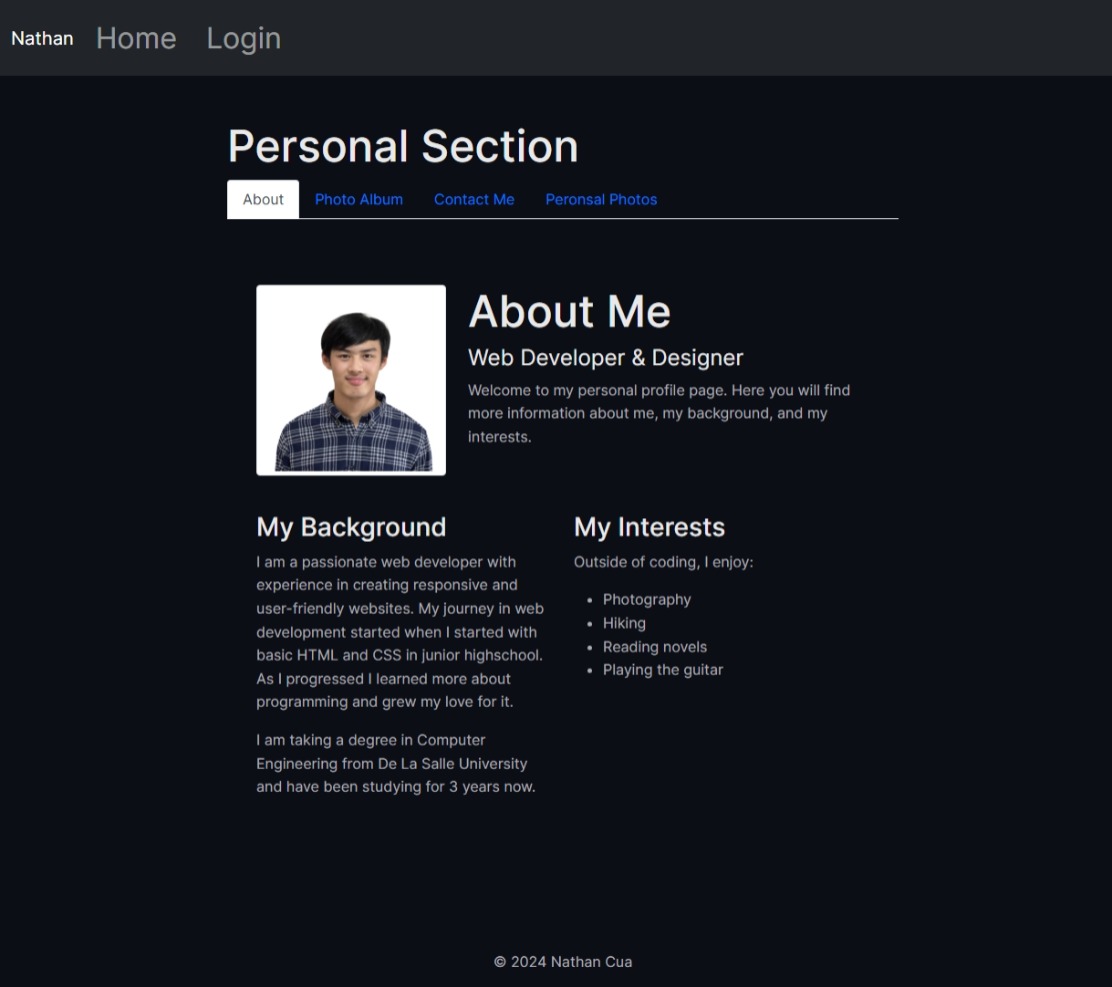
  • Personal Section: Includes an about page, photo album, and password-protected pages.
  • Professional Section: Displays portfolio projects, technical articles, and a service request form.
  • Interactive Elements: Includes Google Charts, a technical calculator, and a video player.
  • Responsive Design: Optimized for desktop and mobile devices.

Screenshots

Home Page

Home Page

Personal Section

Personal Section

Professional Section

Professional Section

Installation

  1. Clone the repository:

    git clone https://github.com/natadecua/portfolio.git
    cd portfolio-website
    
  2. Install Dependencies for the Node.hs server
    cd server
    npm install

  3. Start the Services
    ./run-all.sh

  4. Open Website in Browser
    http://localhost:8000

Technologies Used

  • Frontend: HTML, CSS, JavaScript, Bootstrap
  • Backend: Node.js, Express.js
  • Charts: Google Charts
  • File Uploads: Multer
  • Authentication: LocalStorage-based login system

Deployment

Hosted on GitHub Pages at https://whatthetree.me

07

natadecua.github.io

HTML · ★ 0 · 5mo
Project

natadecua.github.io.

GCF Batangas Test Website

View on GitHub ↗
HTML ★ 0 Updated 5mo

GCF Batangas Test Website

08

gcfbatangas

· ★ 0 · 7mo
Project

gcfbatangas.

church website development

View on GitHub ↗
★ 0 Updated 7mo

gcfbatangas

church website development

09

line-follower-robot-pic16f877a

C · ★ 1 · 1y
Project

line-follower-robot-pic16f877a.

Line follower schematic design

View on GitHub ↗
C ★ 1 Updated 1y

Design of a Line Follower Robot utilizing PIC16F877A Microcontroller

License: MIT
Status

A project demonstrating the design, simulation, and programming of an autonomous line follower robot based on the PIC16F877A microcontroller. This project was developed as part of academic work at De La Salle University.

Table of Contents

Introduction

This repository contains the design files and firmware for a line follower robot. The robot uses Infrared (IR) sensors to detect a contrasting line (e.g., black line on a white surface) and navigates autonomously along the path. The core logic is implemented on a PIC16F877A microcontroller programmed in C. The project demonstrates fundamental concepts in embedded systems, sensor interfacing, motor control, and basic robotics.

The primary goal was to showcase understanding of microcontroller interfacing and C programming through the development of this autonomous system. The design was simulated using Proteus and KiCad.

Features

  • Line Detection: Uses two IR sensors to detect the line.
  • Autonomous Navigation: Follows the detected line automatically.
  • Motor Control: Uses an L293D (or L239D as mentioned in paper) motor driver IC to control two DC motors.
  • Turning Logic: Implements basic turning logic based on sensor readings (stop one motor to turn).
  • PWM Speed Control (Optional): An improved firmware version uses Pulse Width Modulation (PWM) for smoother turns and speed control.
  • Simulation: Circuit design and simulation available in KiCad and Proteus.

Hardware Components

  • Microcontroller: Microchip PIC16F877A
  • Motor Driver: L293D H-Bridge IC (commonly used, paper mentions L239D - verify schematic)
  • Sensors: 2 x Infrared (IR) Sensor Modules (e.g., TCRT5000 based)
  • Motors: 2 x DC Geared Motors
  • Power Supply: Battery (e.g., 9V or LiPo) with Voltage Regulator (e.g., LM7805 for 5V logic)
  • Chassis: Basic robot chassis with wheels

Schematic

(Refer to hardware/kicad/ for the source file)

Schematic Diagram

Software & Firmware

  • Language: C
  • Compiler/IDE: MikroC for PIC (used for development as per paper)
  • Simulation: Proteus ISIS
  • Schematic/PCB: KiCad

Control Logic Flowchart

Flowchart

Firmware Versions

  1. main_basic.c: Implements simple ON/OFF control. Motors are either fully ON or fully OFF based on sensor states.
  2. main_pwm.c: Implements PWM control for motors. Allows for variable speed, enabling smoother turns (e.g., one motor full speed, the other half speed).

Theory of Operation

  1. Sensing: The IR sensors emit infrared light and detect the reflection. White surfaces reflect strongly (logic HIGH output, depending on sensor module), while black surfaces absorb light (logic LOW output).
  2. Processing: The PIC16F877A reads the digital signals from the two IR sensors connected to PORTD (RD2, RD3).
  3. Decision Making: Based on the sensor states:
    • Both sensors OFF line (e.g., HIGH/HIGH): Robot moves forward (both motors ON / full PWM).
    • Left sensor ON line (e.g., LOW/HIGH): Robot turns left (right motor ON/full PWM, left motor OFF/half PWM).
    • Right sensor ON line (e.g., HIGH/LOW): Robot turns right (left motor ON/full PWM, right motor OFF/half PWM).
    • Both sensors ON line (e.g., LOW/LOW): Robot stops (both motors OFF / zero PWM).
  4. Actuation: The microcontroller sends control signals to the L293D motor driver via PORTC (RC4-RC7). The L293D drives the DC motors according to these signals. PWM signals generated by the PIC's CCP modules are used in the main_pwm.c version for speed control.

Getting Started

Prerequisites

  • Simulation:
    • Proteus Design Suite (for .pdsprj simulation)
    • KiCad EDA (for viewing/editing .kicad_sch schematic)
  • Firmware:
    • MikroC for PIC compiler (or compatible C compiler like XC8)
    • PIC Programmer (e.g., PICkit 3/4) to flash the .hex file onto the PIC16F877A.

Simulation

  1. Navigate to the hardware/proteus/ directory.
  2. Open the line_follower.pdsprj file using Proteus ISIS.
  3. Ensure the PIC16F877A component in the simulation is loaded with the desired .hex file from the firmware/bin/ directory (e.g., line_follower_pwm.hex).
  4. Run the simulation. Interact with the virtual IR sensors to observe the robot's motor behaviour.

Firmware

  1. Compilation:
    • Open the C source file (main_basic.c or main_pwm.c) in MikroC for PIC (or import into MPLAB X with XC8).
    • Set the target device to PIC16F877A and configure oscillator settings (if needed).
    • Build the project to generate the .hex file. Pre-compiled files are available in firmware/bin/.
  2. Flashing:
    • Connect the PIC16F877A to your PIC programmer (e.g., PICkit).
    • Use the programmer software (e.g., MPLAB IPE, PICkit Programmer software) to load the generated .hex file onto the microcontroller.

Results

The simulation successfully demonstrated the line following logic. The robot correctly identifies the line using the IR sensors and adjusts motor speeds (in the PWM version) or state (in the basic version) to navigate turns or move straight.

(Include any key observations or quantitative results if available, e.g., simulated speed, turning radius characteristics)

Future Improvements

Based on the project's scope and findings (referencing the paper's recommendations):

  • Physical Prototype: Build and test a physical robot based on the design.
  • PID Control: Implement a Proportional-Integral-Derivative (PID) controller for smoother and more accurate line following, especially at higher speeds and on complex tracks.
  • Sensor Calibration: Add routines for calibrating IR sensors to adapt to different lighting conditions and surfaces.
  • Multiple Sensors: Use an array of sensors (e.g., 4 or more) for better line tracking, especially on sharp turns or intersections.
  • Obstacle Avoidance: Integrate ultrasonic or IR proximity sensors for detecting and avoiding obstacles.
  • Wireless Communication: Add Bluetooth or Wi-Fi for remote monitoring or control.
  • Code Optimization: Refine the C code for better memory usage and faster execution, potentially using interrupts.

Authors

(Based on the provided paper)

  • Ervin Raphael R. Alba - ervin_alba@dlsu.edu.ph
  • Nathanael Adrian T. Cua - nathanael_cua@dlsu.edu.ph
  • Henson Adrian T. Lee - henson_lee@dlsu.edu.ph
  • Roberto Jaime M. Salvador - roberto_jaime_salvador@dlsu.edu.ph
  • Alvin Josh T. Valenciano - alvin_valenciano@dlsu.edu.ph

Department of Electronics and Computer Engineering, De La Salle University, Manila, Philippines

Original Paper

The detailed methodology, literature review, and initial findings are documented in the research paper included in this repository:
[docs/Line_Follower_Robot_Paper.p

10

ARFES-Rabbit-Feeder

C · ★ 0 · 1y
Project

ARFES-Rabbit-Feeder.

View on GitHub ↗
C ★ 0 Updated 1y

Automatic Rabbit Feeding System (ARFES)

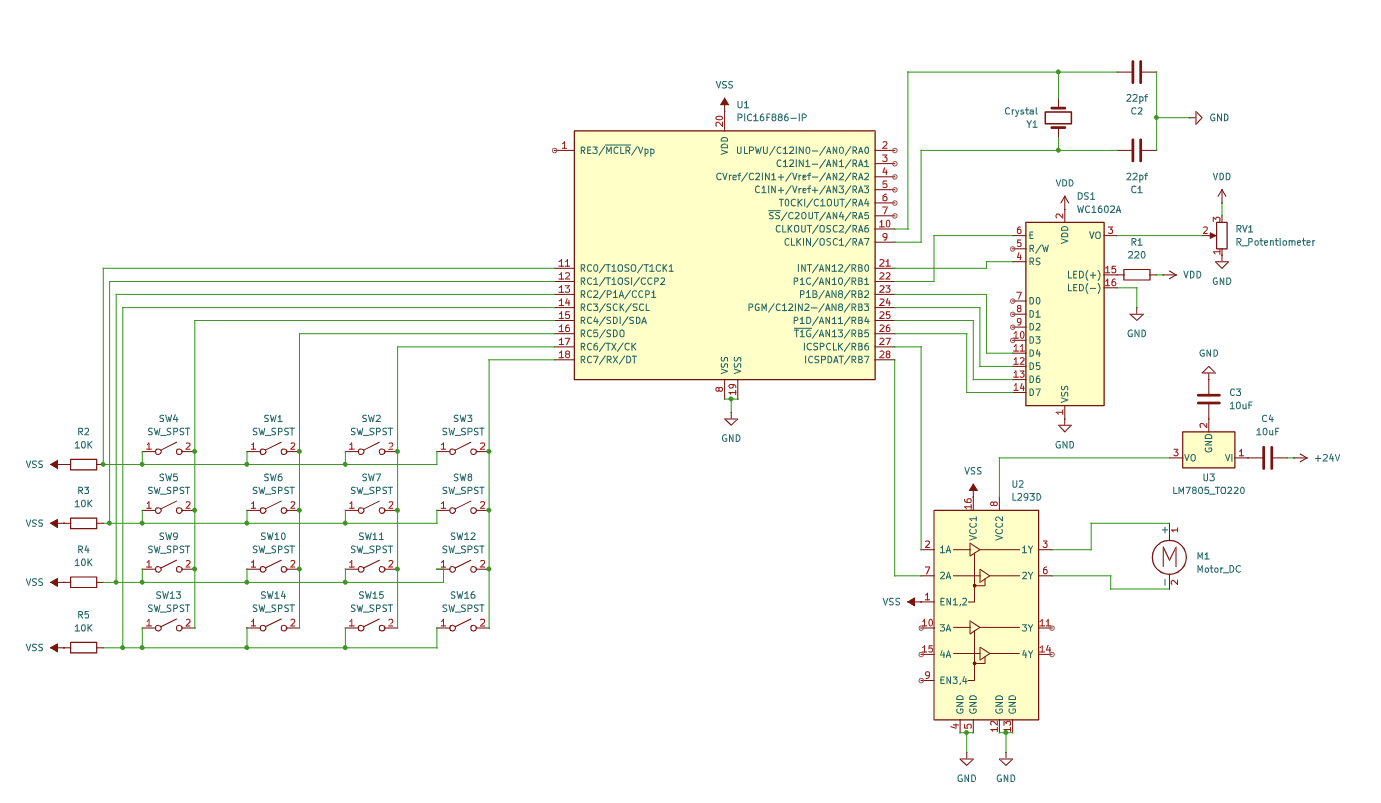
ARFES Schematic

Project Description

The Automatic Rabbit Feeding System (ARFES) is an embedded systems project designed to automate the feeding process for rabbits using a PIC microcontroller (PIC16F886). This system aims to help farmers manage rabbit feeding schedules more systematically and efficiently.

Users can configure the system via a 4x4 keypad to set:

  1. Motor Speed: Controls the speed of the DC geared motor (acting as a servo) using Pulse Width Modulation (PWM), regulating how fast the food is dispensed.
  2. Running Time (Timer 1): Determines how long the motor runs to dispense pellets.
  3. Delay Time (Timer 2): Sets the interval between feeding cycles.

The system provides feedback and prompts the user through a 16x2 LCD display.

Author: Nathanael Adrian T. Cua
ID: 12134945

Features

  • Automated pellet dispensing for rabbits.
  • User-configurable motor speed (PWM controlled).
  • User-configurable feeding duration (Timer 1).
  • User-configurable delay between feedings (Timer 2).
  • 4x4 Keypad for user input.
  • 16x2 LCD for status display and user prompts.
  • Based on the PIC16F886 microcontroller.

Hardware Components

  • Microcontroller: Microchip PIC16F886
  • Display: 16x02 Character LCD (e.g., WC1602A) with contrast potentiometer (RV1).
  • Input: 4x4 Matrix Keypad.
  • Motor Driver: L293D H-Bridge Motor Driver.
  • Actuator: DC Geared Motor (M1).
  • Power Regulation: LM7805 +5V Voltage Regulator.
  • Oscillator: Crystal Oscillator (Y1) with load capacitors (C1, C2).
  • Passive Components: Resistors (pull-ups for keypad rows, current limiting for LCD backlight), Capacitors (decoupling, timing).

Schematic: The detailed circuit diagram can be found in the hardware/ directory:

Software (Firmware)

The firmware is written in C using the MikroC for PIC compiler.

  • Location: firmware/ directory.
  • Main File: arfes_main.c (or your specific filename).
  • Key Functions:
    • Initialize_LCD(): Sets up the LCD display.
    • Keypad_Init(): Configures microcontroller pins for keypad scanning.
    • Keypad_Read(): Scans the keypad and returns the pressed key.
    • Keypad_Get_Time() / Keypad_Get_Speed(): Functions to read multi-digit numbers from the keypad for settings.
    • Display_*() Functions: Various functions to show status/prompts on the LCD.
    • PWM1_Init(), PWM1_Start(), PWM1_Set_Duty(), PWM1_Stop(): MikroC library functions used for PWM motor control.
    • main(): Initializes hardware, enters the main loop to get user settings (Speed, Timer1, Timer2), controls the motor based on settings, and repeats.

Control Logic:

  1. Initialize LCD, Keypad, and PWM.
  2. Display start screen.
  3. Prompt user to enter Motor Speed (0-99%).
  4. Prompt user to enter Timer 1 duration (running time in seconds).
  5. Prompt user to enter Timer 2 duration (delay time in seconds).
  6. Display combined status.
  7. Start PWM output.
  8. Turn on motor using L293D (e.g., motor_pin1 = 1, motor_pin2 = 0).
  9. Wait for delayTime1 seconds.
  10. Turn off motor (motor_pin1 = 0, motor_pin2 = 0).
  11. Stop PWM.
  12. Wait for delayTime2 seconds.
  13. Repeat from step 2 (or step 7, depending on desired loop). Note: The provided code loops back to getting input.

Repository Structure

├── firmware/ # MikroC source code
├── hardware/ # KiCad schematic files and PDF export
├── images/ # Images used in this README (schematic, optional photos)
├── .gitignore # Specifies intentionally untracked files that Git should ignore
├── LICENSE # Project license file (e.g., MIT)
└── README.md # This documentation file

Setup and Building

  1. Hardware: Assemble the circuit according to the schematic in the hardware/ directory.
  2. Software Toolchain: You need the MikroC for PIC compiler installed.
  3. Building:
    • Open the MikroC project (or create one and add the .c/.h files from firmware/).
    • Select the correct target device (PIC16F886).
    • Configure the project settings (e.g., oscillator frequency based on your crystal - typically 8MHz or 20MHz for these projects).
    • Build the project to generate the .hex file.
  4. Programming: Use a PIC programmer (like PICkit 3/4) and appropriate software (like MPLAB IPE) to flash the generated .hex file onto the PIC16F886 microcontroller.

Future Improvements (Optional)

  • Implement a Real-Time Clock (RTC) module for scheduled feeding times instead of simple delays.
  • Add multiple feeding schedule slots.
  • Incorporate a sensor to detect low pellet levels.
  • Add EEPROM storage to save settings across power cycles.
  • Explore options for remote monitoring or control (e.g., using ESP8266/ESP32).

License

This project is licensed under the MIT License - see the LICENSE file for details.

11

Date-based-Linux-Perl-File-sorter

Perl · ★ 0 · 1y
Project

Date-based-Linux-Perl-File-sorter.

The development and implementation of a Perl script designed to automate the sorting of files by modification date within Linux environments.

View on GitHub ↗
Perl ★ 0 Updated 1y

Perl Date-Based File Sorter for Linux

A Perl script designed to automate the sorting of files within a specified directory based on their last modification date, organizing them into date-stamped subdirectories. This script is based on the research paper "Date-based File Sorting Perl Script for Linux Operating Systems" by Cua, Castro, Mayor, and Sebastian from De La Salle University Manila.

Abstract (from paper)

In the landscape of modern computing, efficient file management is crucial, particularly in environments generating large volumes of data. This script automates the sorting of files by modification date within Linux environments. The primary objective is to streamline file organization, reducing manual effort and minimizing the potential for human error. The script leverages Perl's robust capabilities to handle file operations, creating directories as needed and ensuring files are systematically categorized.

Features

  • Sorts files based on their last modification date.
  • Prompts the user for the source (input) directory and the base destination (output) directory.
  • Automatically creates a base destination directory if it doesn't exist.
  • Automatically creates date-specific subdirectories (format: YYYY-MM-DD) within the base destination directory as needed.
  • Moves files from the source directory into the corresponding date subdirectory in the destination.
  • Includes error handling for:
    • Non-existent source directories.
    • Failure to create destination directories.
    • Failure to read file modification times.
    • Failure to move files.
  • Skips non-regular files (like directories or symbolic links) within the source directory.
  • Provides a summary report upon completion.

Prerequisites

  • Perl: A working Perl interpreter (usually pre-installed on most Linux distributions).
  • Standard Perl Modules: strict, warnings, File::Copy, File::Path, File::Basename, Time::Piece. These are typically part of the standard Perl distribution.
  • Linux/Unix-like Environment: The script relies on Unix-style paths and file system operations.

Installation

  1. Download: Download the sort_files_by_date.pl script to your local machine.
  2. Make Executable (Optional but recommended): Open your terminal and run:
    chmod +x sort_files_by_date.pl
    

Usage

  1. Open your terminal.
  2. Navigate to the directory where you saved the script, OR provide the full path to the script.
  3. Run the script using:
    perl sort_files_by_date.pl
    
    or, if you made it executable:
    ./sort_files_by_date.pl
    
  4. The script will prompt you to enter:
    • The source directory (the folder containing the files you want to sort).
    • The base destination directory (the folder where the date-stamped subdirectories will be created).
  5. Press Enter after each input. The script will then process the files and report the results.

Example:

Use code with caution.
Markdown
$ ./sort_files_by_date.pl
Enter the source directory: /home/user/Downloads/unsorted_files
Enter the base destination directory: /home/user/Documents/sorted_archive
Processing files in '/home/user/Downloads/unsorted_files'...
Creating destination directory: '/home/user/Documents/sorted_archive/2024-06-19'
Creating destination directory: '/home/user/Documents/sorted_archive/2024-06-26'
Skipping '.hidden_dir': Not a regular file.
--- Sorting Complete ---
Source Directory: /home/user/Downloads/unsorted_files
Base Destination Directory: /home/user/Documents/sorted_archive
Files Moved: 5
Files Skipped: 1
Files have been sorted by modification date into corresponding subdirectories.

Screenshots (Based on Figures from the Paper)

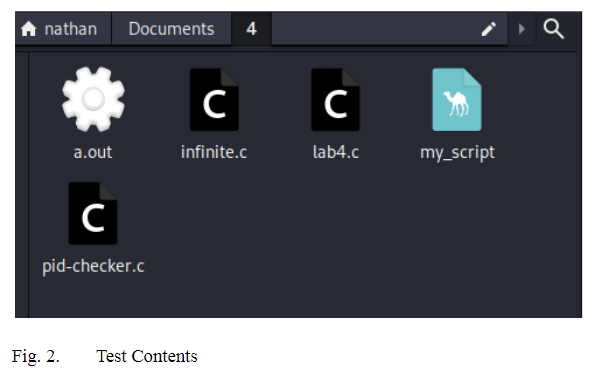
Figure 1 & 2: Example Source Directory ('test') and its Contents
Test Folder Contents
(Caption: Shows the initial state of the 'test' directory containing various files.)

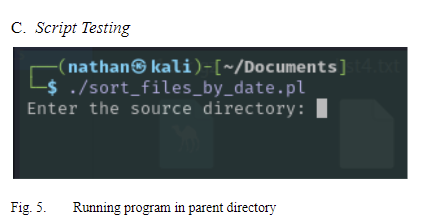
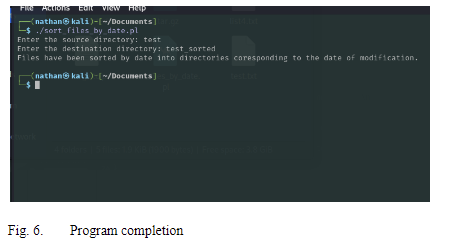
Figure 5 & 6: Running the Script and Completion
Running the Script
(Caption: Shows the script execution in the terminal, prompting for input.)

Script Completion
(Caption: Shows the script's completion message after processing files.)

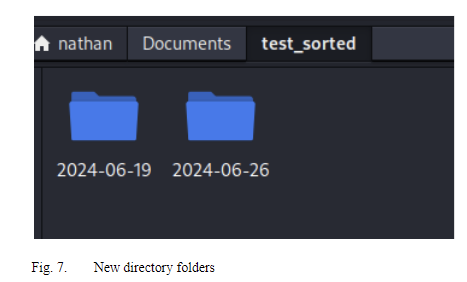
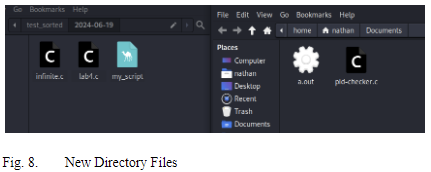
Figure 7 & 8: Resulting Destination Directory ('test_sorted') Structure
New Directory Folders
(Caption: Shows the created date-based subdirectories within the destination folder.)

Files in Date Subdirectory
(Caption: Shows files moved into one of the date-specific subdirectories (e.g., 2024-06-19).)

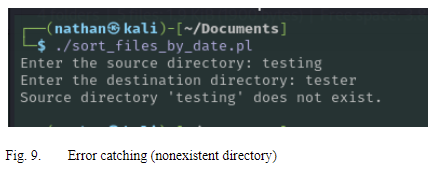
Figure 9: Error Handling Example
Error Catching
(Caption: Demonstrates the script handling an error when a non-existent source directory is entered.)

How it Works

  1. Initialization: Loads necessary Perl modules.
  2. Input: Prompts the user for source and destination paths.
  3. Validation: Checks if the source directory exists. Creates the base destination directory if needed.
  4. Iteration: Opens the source directory and reads its contents one item at a time.
  5. Filtering: Skips special entries (. and ..) and non-regular files.
  6. Date Extraction: Gets the last modification timestamp (mtime) for each regular file using stat.
  7. Formatting: Converts the timestamp to a YYYY-MM-DD string using Time::Piece and strftime.
  8. Directory Creation: Constructs the path for the date-specific subdirectory within the destination. Creates this subdirectory if it doesn't already exist using File::Path::make_path.
  9. File Movement: Moves the file from the source directory to the newly determined date-specific destination directory using File::Copy::move.
  10. Reporting: Keeps track of moved and skipped files and prints a summary upon completion.

Future Enhancements (Based on Paper Recommendations)

  • Customizable Sorting Criteria: Allow sorting by creation date, file type, size, etc.
  • User-Defined Rules/Filters: Implement pattern matching or metadata filtering.
  • Advanced Directory Structure: Support nested subdirectories (e.g., Year/Month/Day).
  • Archiving Feature: Option to move files older than a certain date to a separate archive location.
  • Logging: Implement a logging system to record all actions and errors to a file.
  • GUI: Develop a graphical user interface for ease of use.
  • Configuration File: Allow users to set preferences (date format, default paths, rules) via a config file.
  • Parallel Processing: Handle large directories more efficiently.
  • Incremental Sorting: Option to only sort new or modified files since the last run.
  • Cloud Sync/Version Control Integration: Add options to sync with cloud storage or integrate with systems like Git.

License

This project is licensed under the MIT License - see the LICENSE file for details.

Acknowledgments

  • Based on the research paper: "Date-based File Sorting Perl Script for Linux Operating Systems" by Nathanael Adrian T. Cua, Carlos Miguel M. Castro, Gabrielle Adlei N. Mayor, and James V. Sebastian, De La Salle University Manila.
12

Enhanced-RISC-based-Processor

· ★ 0 · 1y
Project

Enhanced-RISC-based-Processor.

Design of an Enhanced RISC-based Processor with Increased Memory Capacity and I/O Ports

View on GitHub ↗
★ 0 Updated 1y

Enhanced RISC-based MIPS Processor

Overview

This project outlines the design of an enhanced RISC-based MIPS processor with increased memory capacity and I/O ports, based on the specifications provided in the documentation/DesignDocument.pdf research paper. The design aims to improve the performance and versatility of a standard MIPS architecture.

Key Enhancements

  • Increased Memory: Target memory capacity of 4GB.
  • Additional I/O Ports: Four I/O ports (PORTA, PORTB, PORTC, PORTD) for expanded device interaction.
  • IEEE-754 FPU: Integration of a floating-point unit compliant with the IEEE-754 standard for robust handling of floating-point arithmetic.

Project Structure

Enhanced-RISC-MIPS/
├── README.md
├── documentation/
├── verilog/ (Placeholder)
├── testbenches/ (Placeholder)
├── images/
└── LICENSE

  • documentation/: Contains the DesignDocument.pdf detailing the architecture, design choices, and testing methodologies.
  • verilog/: (Placeholder) Intended for the Verilog implementation of the processor modules. See the verilog/README.md for more information about planned module design.
  • testbenches/: (Placeholder) Intended for Verilog testbenches used to verify the functionality of the processor modules. See the testbenches/README.md for the described testing approach.
  • images/: Contains the figures included in the DesignDocument.pdf.

Key Figures

Circuit Diagram
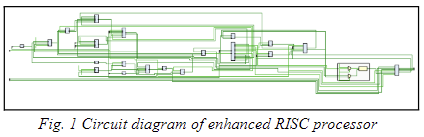
Circuit Diagram
Figure 1: Circuit diagram of the enhanced RISC processor

CPU Memory Module
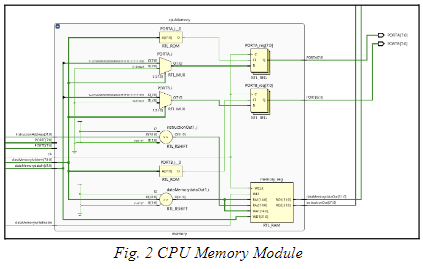
CPU Memory Module
Figure 2: CPU Memory Module

Data Memory MUX Modules
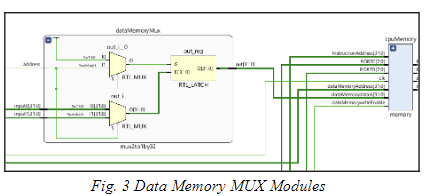
Data Memory MUX Modules
Figure 3: Data Memory MUX Modules

float MUX and float Reg Modules
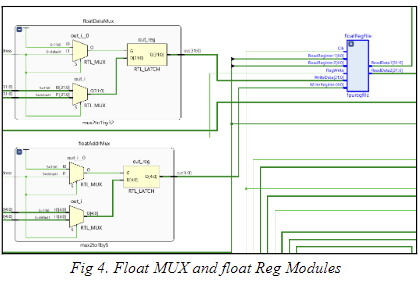
float MUX and float Reg Modules
Figure 4: float MUX and float Reg Modules

ALU, fpu and opcode Decoder Modules
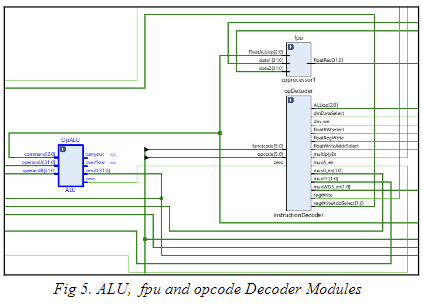
ALU, fpu and opcode Decoder Modules
Figure 5: ALU, fpu and opcode Decoder Modules

MUX and Program Counter Modules
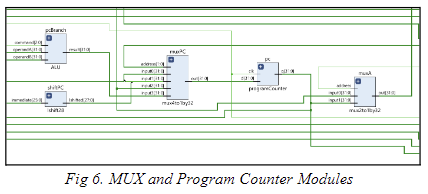
MUX and Program Counter Modules
Figure 6: MUX and Program Counter Modules

Main Register, MUX, and Write Modules
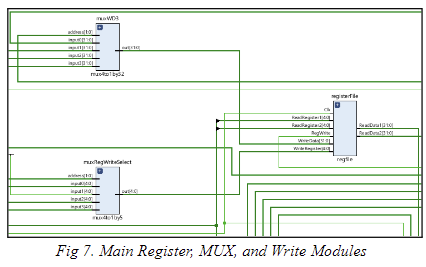
Main Register, MUX, and Write Modules
Figure 7: Main Register, MUX, and Write Modules

Sign Extension, MUX, and Multiply Modules
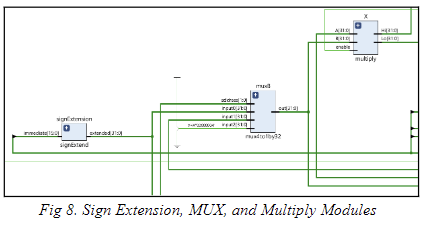
Sign Extension, MUX, and Multiply Modules
Figure 8: Sign Extension, MUX, and Multiply Modules

Addition and Subtraction of Floating Point Numbers
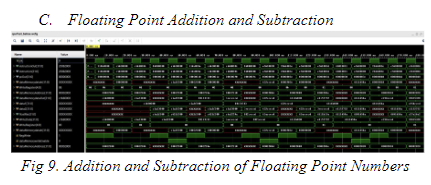
Addition and Subtraction of Floating Point Numbers
Figure 9: Addition and Subtraction of Floating Point Numbers

Multiplication and Division of Integers
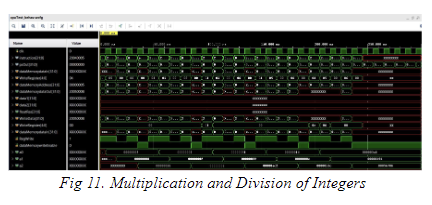
Multiplication and Division of Integers
Figure 10: Multiplication and Division of Integers

I/O Ports Timing Simulation
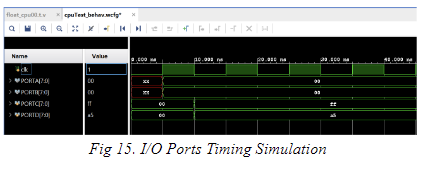
I/O Ports Timing Simulation
Figure 15: I/O Ports Timing Simulation

I/O Ports Schematic Diagram
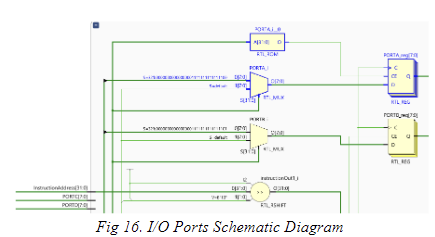
I/O Ports Schematic Diagram
Figure 16: I/O Ports Schematic Diagram

Timing Diagram for Memory Addresses
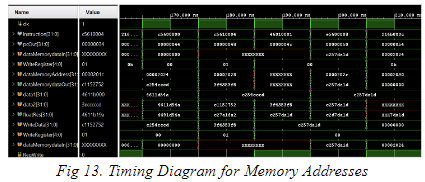
Timing Diagram for Memory Addresses
Figure 13: Timing Diagram for Memory Addresses

Data Memory Multiplexer
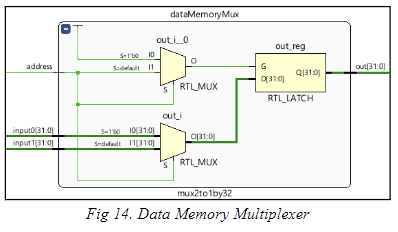
Data Memory Multiplexer
Figure 14: Data Memory Multiplexer

Planned Implementation (Verilog Directory)

(See verilog/README.md for a description)

Although Verilog code is not yet available, the following modules are envisioned for the complete implementation:

  • CPU Core Modules: ALU, Control Unit, Register File, Memory Interface
  • I/O Modules: Individual modules for PORTA, PORTB, PORTC, and PORTD, handling bidirectional data flow.
  • FPU Modules: Modules for floating-point addition/subtraction, multiplication/division.

Planned Test Approach (Testbenches Directory)

(See testbenches/README.md for a description)
The testbenches are intended to ensure proper functioning of all the processor components

License

This project is licensed under the MIT License.
Rhythm 4 commits · 2 active weeks
peak: 3